
AudioSwap
AudioSwap makes deliverables faster
Replace your video's audio in seconds — without touching a single frame.
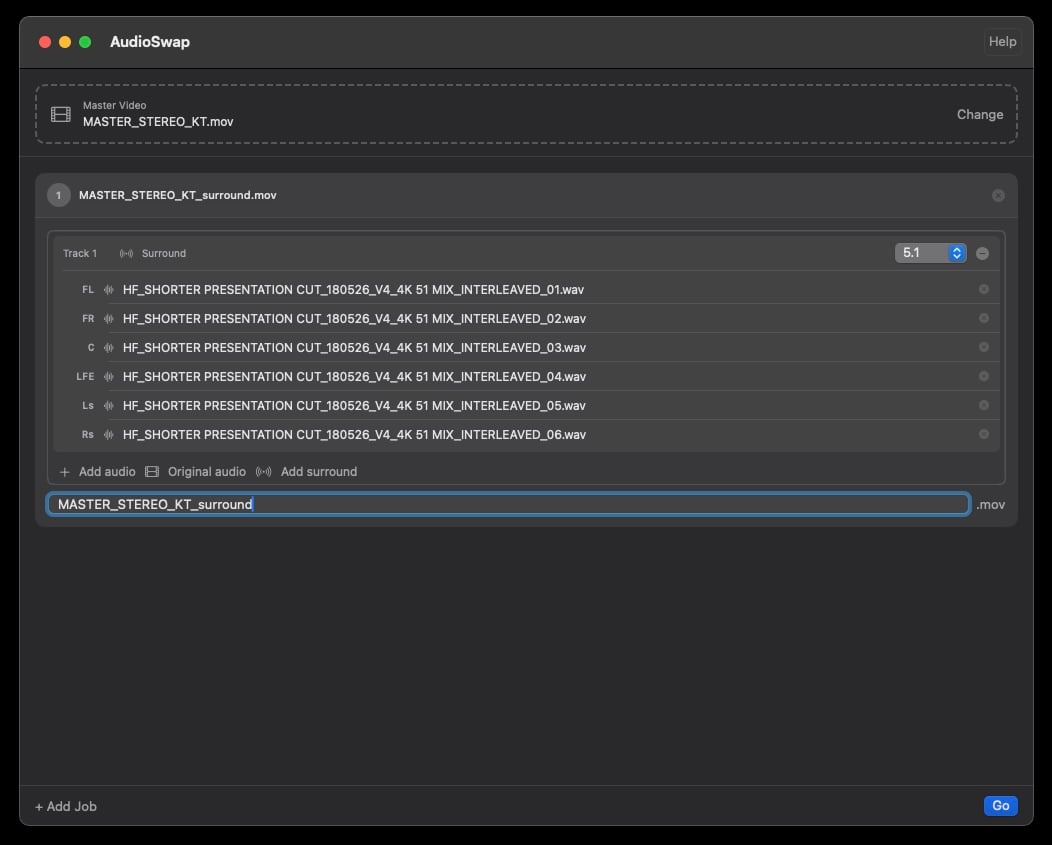
AudioSwap combines audio and video streams using ffmpeg, without re-encoding a single frame of your picture.
Drop your source video, add/replace your audio tracks, and hit Go.
What AudioSwap does
- Swap audio on any video without re-encoding picture — the file remuxes in seconds, not minutes
- Run multiple jobs in one batch — stereo, 5.1, discrete stems — all from the same master
- Build a true 5.1 or 7.1 stream from six or eight individual mono channel files
- Keep the original audio alongside new tracks — useful when the embedded mix is a reference
- Split multi-channel files into discrete mono streams
- Video is always stream-copied — no re-encode, no quality loss, near-instant regardless of resolution
How it works
1. Drop your master video
2. Add a job — name your output file
3. Add audio tracks: individual files, the original embedded audio, or a surround group
4. Hit Go — files land in the same folder as your master
Built for real post-production workflows
- Finishing editors delivering multiple audio versions to a client
- Sound editors handing off stems to picture
- Broadcast and documentary editors working with discrete mono tracks
- Anyone who's spent twenty minutes in the wrong export dialogue
What you get
- Batch processing — multiple jobs from one master video, run sequentially
- Surround join — combine 6 or 8 mono files into a single 5.1 or 7.1 stream
- Discrete mode — splits multi-channel files into individual mono streams for NLE import
- Duration check — warns you before a short audio file cuts your video off early
- Live ffmpeg stats — frame count, speed, ETA, file size while it runs
- Full ffmpeg log per job — inspect exactly what happened
Requires ffmpeg — free, installed once via Homebrew. Full instructions included.
macOS 13 or later.
Free or Pay-what-you-want. Free updates. No subscription.
FAQ
macOS blocking the app?
This app isn't yet notarized through Apple's Developer Program, so macOS shows a warning the first time you open it — this is normal for indie-distributed software, not a sign anything's wrong.
Right-click on the app AudioSwap → Choose Open → Open again on the confirmation dialog.
If macOS still refuses, go to System Settings → Privacy & Security and click Open Anyway next to the blocked-app message.
Can't I just do this in my NLE?
You can — but you're rendering.
AudioSwap stream-copies the video without any additional effort.
What's discrete mode for?
When you have a multi-channel audio file — say, a 6-track field recording — most NLEs will import it as stereo pairs. Discrete mode splits it into individual mono streams, so Premiere or Resolve sees each channel as its own track.
What if my audio is shorter than the video?
AudioSwap checks before it runs and warns you, listing exactly which tracks are short and by how much. You can cancel and fix it, or continue anyway.
Does it work with MP4?
Yes. MOV, MP4, MKV — if ffmpeg handles it, AudioSwap handles it.
Do I need ffmpeg already installed?
No. If it's not found, AudioSwap shows you exactly how to install it — one Terminal command, takes just a minute.