Tidy Media Manager
Look Like a Pro: Share Tidy Projects
If you're an Adobe Premiere Pro Editor, Tidy Media Manager is your new best friend!
As you know, every time you use the Premiere Pro Project Manager function to consolidate a project down to only the material used in a specific Sequence, it dumps every single related media file into one giant folder as a result.
What a mess.
If you want to be able to share that consolidated project and folder with another editor, the lack of organisation is a nightmare.
Tidy Media Manager fixes that.
One-time purchase. Lifetime updates. Two-machine license.
Download the Preview file to test in Demo mode.
How TMM Tames Chaos
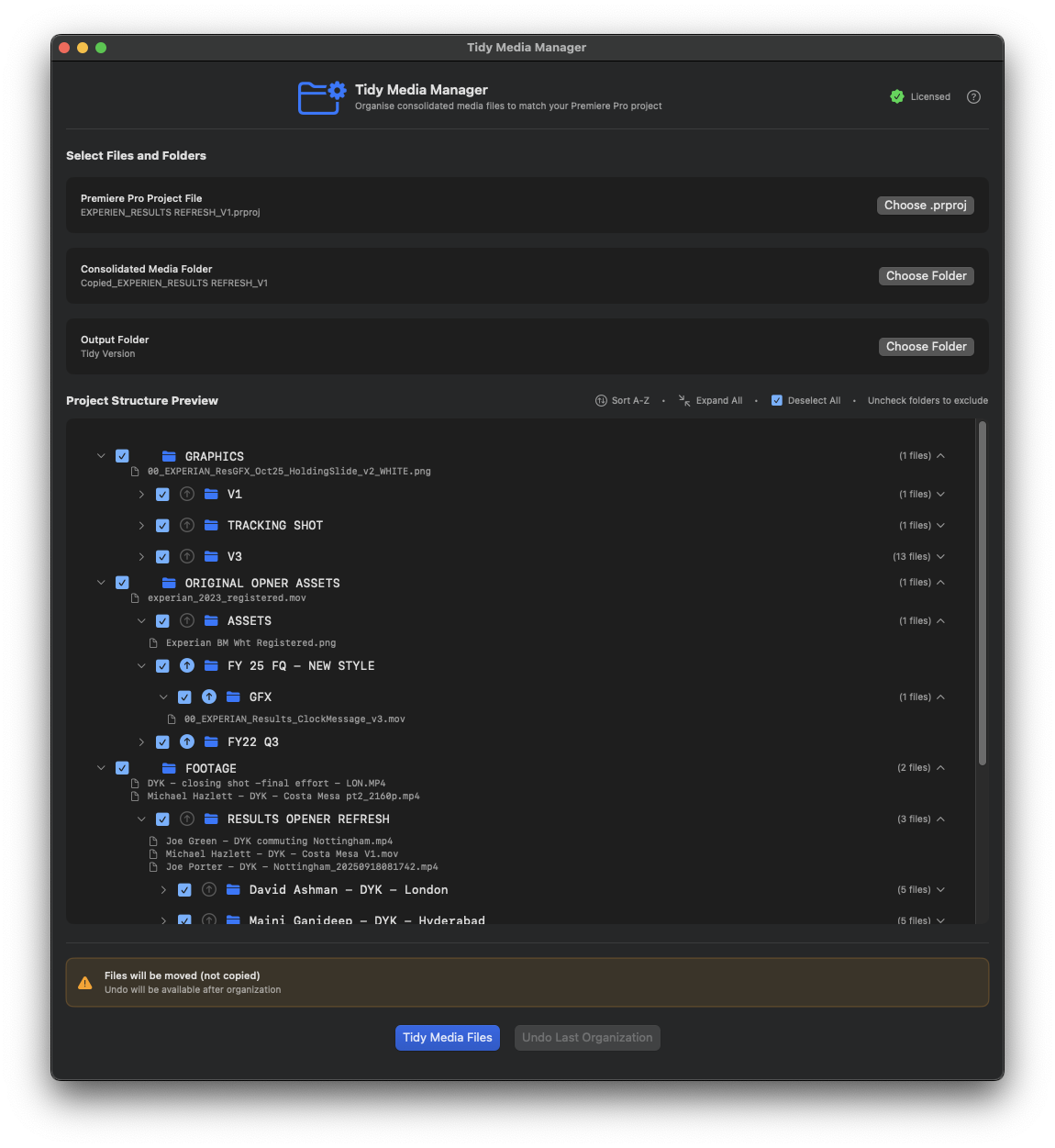
In 3 clicks, you can transform that Consolidated Media Folder into a neatly structured deliverable that matches your original bin structure inside your Premiere Pro project. Each and every piece of consolidated media is happily organised into tidy folders.
Other features include:
- Consolidate sub-folders into parent folders to simplify complex structures.
- Exclude folders from organisation if you want to leave those behind.
- Undo your last tidy in a click.
Best of all, it's really quick to do!
What's new in Tidy Media Manager v2.0
New features
- Relinked project: New _Tidy copy of your project with all media re-linked to the tidied files.
- Folder naming: New option to make folder names UPPERCASE or Title Case.
- Numbered folders: Number your top-level folders (01_, 02_…) in the order shown in the preview.
- _Project Level Items folder: clips at the top level of your Project panel, outside any bin, get their own folder.
- _Not in Project folder: Anything in the consolidated folder that isn't part of the project is tidied here
- Proxies and captions: Now tidied into the same folder as their clip and stay linked.
- New help guide: Help → Tidy Media Manager Help now opens a clear, illustrated guide.
Improvements
- More accurate file matching: files are found even if you renamed clips in your bins, the upper/lower case differs (.MOV / .mov), or names contain accented characters.
- Bins with the same name (e.g. an "Audio" bin in several places) can now be excluded or merged independently.
- Much faster tidying: files on the same drive are moved instantly instead of being copied then deleted, so no extra disk space is needed.
- Merging a bin with sub-bins now brings the sub-bins up with it.
- Undo works even after quitting and reopening the app, and cleans up everything the tidy created.
- Clearer results: any files that couldn't be moved are listed along with the reason.
- More file types: every media type in your project is tidied, including BRAW, MTS, HEIC and others that were previously skipped.
- Tidy Structure.txt now exactly matches what's on disk.
- Large projects load more reliably.
- Clear message if you select a Dropbox or iCloud project that hasn't been downloaded to your Mac.
- Updated welcome tour, and a tidier options row above the preview.
What's new in v1.8
- Premiere Project folder — .prproj file is automatically placed in a dedicated folder in the output
- Copy mode — copy files instead of moving them; originals stay exactly where they are
- Smarter undo — undo in move and copy mode; removes copied files and empty folders automatically
- Missing files warning — see which files aren't found in your source folder before you tidy
- Drag and drop — drop a .prproj or folder directly onto the window to fill the fields instantly
- Open in Finder — jump straight to your output folder from the results screen
- Undo history — the last 3 tidy operations are stored so you can step back if needed
- Help menu — access the user guide any time from the menu bar